VVMapping.com - providing high quality mapping products for outdoor recreation
|
|
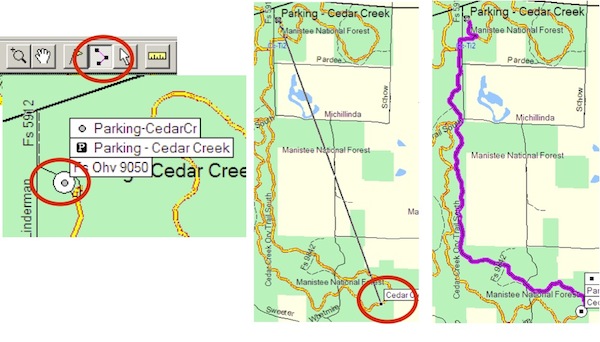
Routing Frequently Asked Questions "Turn by Turn" directions, also known as Auto-Routing, on the GPS are supported by our maps if the device/app supports it. Currently this is only Garmin GPS units. Lowrance and Android tablets support routing, but will not automatically snap to the road/trail nor will the prompt to turn "right on trail x". Turn by turn directions on a Garmin unit will snap to the road/trail and will prompt you when to turn. Auto-routing is the ability for the GPS to calculate a path from point A to point B, by road or trail and guide you along that path indicating when to turn. When using the Route Tool in MapSource or BaseCamp (both Garmin programs), it's the ability for the route line to "snap to" a given road; for the User to be able to click on point A, then click on point B and have the computer pick the lines in between, connecting those dots for you. For actual use, on the computer, you can use the Route Tool to pre-plan your trip and get a close estimate on distance. That route can then be transferred to the GPS and navigated depending on the model of GPS. An example of using the Route Tool in MapSource to create a route from the Cedar Creek parking lot to a point further out on the trail:
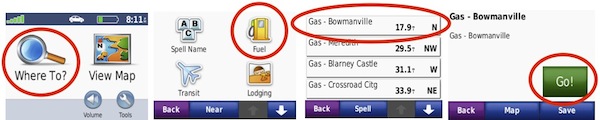
On the GPS, the function can be the ability to locate a destination and have the GPS provide guidance on how to arrive at that destination. For example, a Find can be performed on the GPS for the parking lot and then have the GPS "GO" to that location, generating a path to follow with turn by turn directions. Example of finding a gas station using a Nuvi (other models are similar, but have a different screen layout):
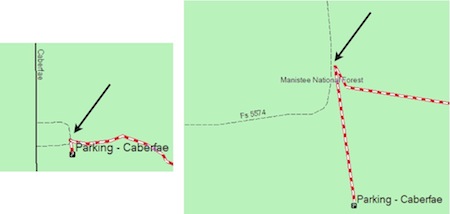
The maps are designed to prefer potentially legal trails/roads. With our GL ORV GPS Maps, the preference is built in to try and use ORV Routes and ORV Trails, followed by open roads that are also snowmobile trails, then open forest roads and secondary open-county roads , then open primary county roads. Our AP ORV Maps have similar preference, with the major difference being routing will prefer green, then blue trails, then roads and other trails. The routing does not automatically know what is or is not legal for your vehicle - do not assume the GPS will only keep you on legal roads/trails. If the GPS is told to start or end on a destination that is not open, it will do as it is told. Your GPS, as well as the software on your computer, have preferences for routing. Enabling "avoid toll roads" will further emphasise the route to be placed on path more likely to be "ORV legal". For example, all non-open roads have been categorized as "toll roads", so enabling an avoidance for those types of roads will help to keep the suggested path on legal roads and trails. For autorouting to function, the GPS must be relatively near a "routing road" on the map. For our GL ORV maps, this includes the ORV system, county roads, national forest roads, highways and expressways. It does not include private roads or non-motorized trails. If you are not near one of those "routing roads' the GPS will most likely give an error when attempting to generate a route. In these cases, you will need to manually choose a nearest point on the map and perform a "Go" for those models that support it or manually navigate by the map screen until you/GPS are near a "routing road". There are errors in our data set where, for example, an ORV Route may visually connect to a road, but technically (from computer's perspective) does not. In these situations the route will not connect from road A to Route B, but will use road C and D to connect to Route B. We are constantly working to solve these issues and your input is greatly appreciated if you encounter any. Here's one (now corrected) example of the trail not technically touching the forest service road, although at most zoom points it visually appears to do so:
|
Back to Support |